How to Delete Sent Course(s) for a User
As a Tenancy Admin, you are able to delete outstanding courses for your users via the portal. Log into the Portal. On the left navigation bar, click Dashboard. Scroll down to User Search. Search for…

Updated
by Meg Bird
As a Tenancy Admin, you are able to delete outstanding courses for your users via the portal.
- Log into the Portal.
- On the left navigation bar, click Dashboard.
- Scroll down to User Search.
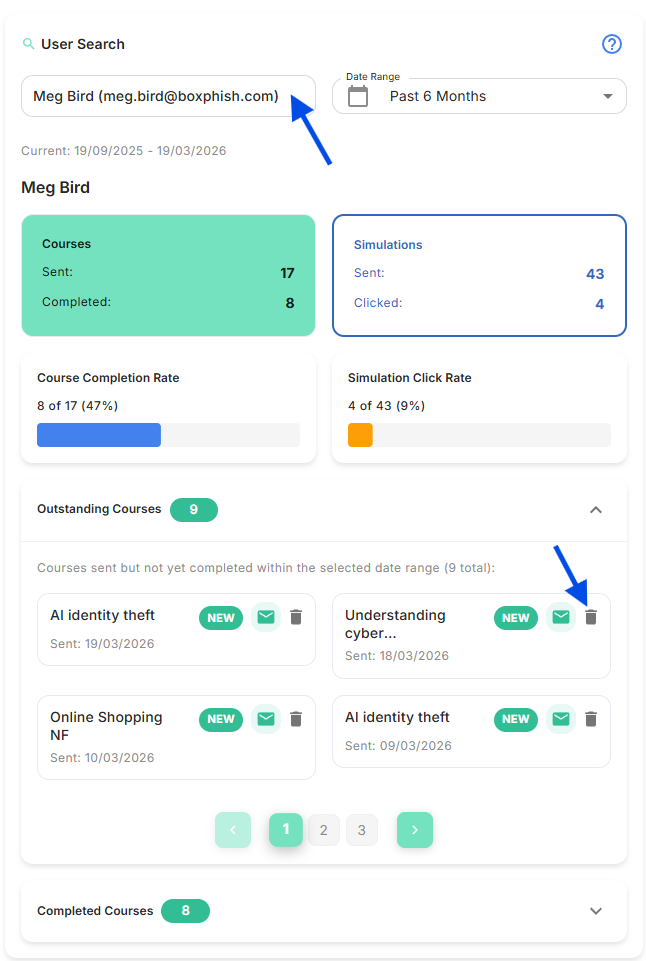
- Search for a User.
- Expand Outstanding Courses, then click the bin icon on the relevant course:
If you require to remove courses on mass for your users, please send in your request to support@boxphish.com, with the relevant User and Course details.
How did we do?
Why is the Newsfeed blank?
How to Disable/ Enable User
