De-Duplication of Courses and Simulations
De-Duplication Settings can provide ability to supress simulation and course assignment if users have already received, negating duplications caused by: multi-group function, auto-course assignment a…

De-Duplication Settings can provide ability to supress simulation and course assignment if users have already received, negating duplications caused by: multi-group function, auto-course assignment and accidental sending.
This is often needed when you have Multi-Group Membership enabled and you are sending content via AD groups. If you have any questions about this, please contact your Customer Success Manager.
Settings:
These settings can be found via Settings > General > De-Duplication:
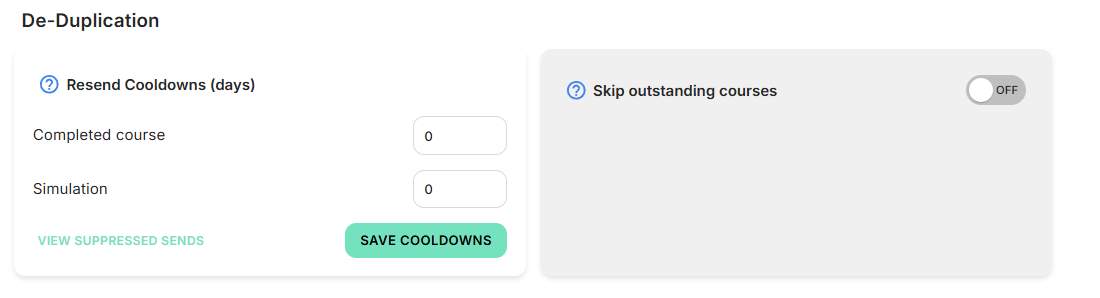
Resend Cooldowns:
Minimum days before the same content can be re-sent to a user:
- Input 0 (standard setting), which means the feature is not configured.
- Input a timeframe from 1 to 30 days, which means if the same content is sent within that timeframe it will not be emailed nor assigned.
Skip outstanding courses:
While a user has an outstanding course, the same course will not be sent nor assigned to them.
Logs:
We have logs available that show any courses or simulations that have been skipped due to the logic applied. These can be accessed via the 'VIEW SUPPRESSED SENDS' button on the settings widget, or directly from Logs > Activity > Suppressed Sends.
If you have any questions regarding any information within this article, please reach out to your Customer Success Manager or our Support Team at support@boxphish.com.
How did we do?
Single Sign-On from the Okta Dashboard
How do Batches work?
